The time-consuming process is the biggest hurdle when it comes to labeling datasets for computer vision. But the good news is that Automated Video Annotation provides the ultimate solution for this! It is achievable by leveraging machine learning algorithms, which cuts down production time by up to 80% while maintaining high accuracy across millions of frames.
That being said, traditional manual labeling is no longer sustainable for modern AI projects! Now, automation is the only way to scale. Engineers who aim to fill the gap between raw video footage and structured training data without spending months on a single dataset often employ these AI techniques: MOT, Interpolation, Micro-Models, Auto Object Segmentation, Keyframe Extraction & Pre-labeling to speed up the video annotation process.
In this article, we will discuss each technique that speeds up the automatic labeling.
Key Takeaways
- Automated annotation cuts production time by up to 80%, turning raw video into clean, usable datasets in days instead of months.
- AI replaces human fatigue with persistent mathematical consistency and reliably tracks many objects across millions of frames, even in tough situations like poor lighting or occlusion.
- With tools like interpolation and multi-object tracking, you only label about 5% of a video while the system fills in the rest automatically.
- Auto object segmentation goes beyond boxes by creating precise, pixel-level outlines, which are crucial for fields like robotics, healthcare, and self-driving cars.
- Automation has become a competitive necessity, utilizing specialized micro-models to process massive datasets that would be logistically and financially impossible to handle manually.
What Is Automated Video Annotation?
Automated Video Annotation uses powerful artificial intelligence to pinpoint target objects. Robust machine learning models drive the entire video annotation process. The technology will identify, track, and label every video sequence instantly.
Sophisticated software evaluates motion and context to produce accurate preliminary labels. This efficient system frees the human worker from drawing tedious bounding boxes. Consequently, computer algorithms rapidly process thousands of frames to create your training data.
Manual vs. Automated Video Annotation: A Quick Comparison

| Feature | Manual Video Annotation | Automated Video Annotation |
|---|---|---|
| Speed | Extremely slow; frame-by-frame effort. | Lightning-fast; processes thousands of frames in minutes. |
| Consistency | Human fatigue leads to errors in placement. | Precise mathematical consistency across frames. |
| Cost | High; requires massive human resources. | Low; optimizes the AI development workflow. |
| Scalability | Hard to scale for large video datasets. | Designed for processing millions of frames. |
Modern enterprises use data annotation services to implement robust automated pipelines. These expert partners help companies process massive video datasets efficiently. Researchers and machine learning engineers delegate high-volume, complex tasks to these external specialists.
By offloading this work, they avoid overwhelming their internal human teams during the AI development workflow. The expert team ensures that every single frame follows exact technical requirements and standards. This collaborative strategy consistently delivers perfect training data for any scale.
What Are the Benefits of Automated Video Data Annotation?
Harnessing Automated Video Annotation grants your team a major strategic edge. This technology streamlines the entire transition between raw video and actionable datasets. You gain far more than improved internal operations when you speed up video annotation.
Direct automation fundamentally improves the final model performance for your project. Finally, these smart pipelines supply the massive quantities of high-quality training examples required for success.
By leveraging machine learning to navigate specific Video Annotation Challenges and Solutions, such as object occlusion and environmental blur, the following advantages become apparent:
- Enhanced Consistency: Automation ensures labels remain steady across the video sequence, eliminating tracking jitter.
- Reduced Resource Drain: It removes the labor-intensive task of labeling from core engineering teams.
- Optimized Scalability: Teams can now process millions of frames for diverse video datasets with minimal friction.
5 AI Techniques to Speed Up Labeling for Automated Video Annotation
The conversion of manual tasks to the current workflow, supported with AI techniques is based on the algorithmic strategies. Here is how you can use Automated Video Annotation to optimize your workflow.
1. Frame-to-Frame Continuity with Multi-Object Tracking (MOT)

Multi-Object Tracking (MOT) serves as a foundational pillar for Video data labeling AI automation. It effectively identifies multiple objects across frames by assigning each a unique, persistent ID. This system maintains continuity even as targets move or change their perspective significantly.
The mechanism: First, the algorithm executes the accurate detection of objects in the first frame. It then computes a velocity vector to forecast the precise positions from one frame to the other. The tool can be used to seamlessly track bounding boxes by using specialized Kalman Filters. The AI is also unable to bother when the frame rate is adjusted, as it automatically reloads itself without the user having to restart the computer.
Benefits:
- Maintains identity across different viewpoints.
- Handles varying lighting conditions effectively.
- Saves the time of an annotator having to redraw boxes on a continual basis.
Example: Picture five different cars moving through a busy city intersection. MOT assigns labels “Car A” through “Car E” and preserves them even when vehicles cross paths. This technology remains a vital component of OpenCV for Autonomous Car development, where tracking pedestrians and cars is a life-saving necessity.
2. Interpolation to Fill in the Gaps
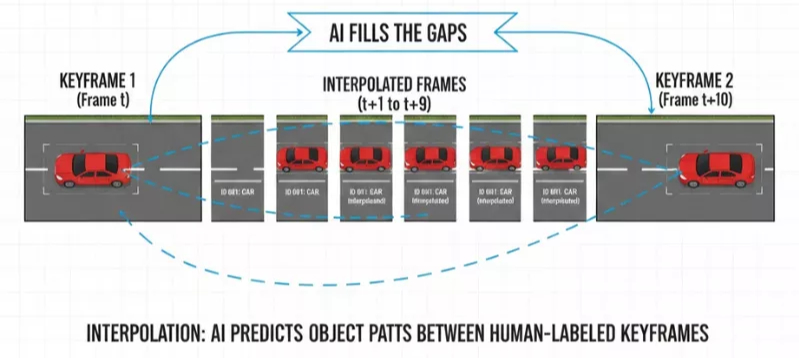
Interpolation is one of the mathematical AI video annotation techniques that makes predictions on labels between some human-labeled keyframes. Using this technique means you no longer need to manually annotate every single frame within a video file.
Principle: The user lays a bounding box on an object in Frame 1, and an object in Frame 10. The Automated Video Annotation engine then calculates the intermediate positions for Frames 2 through 9. This enhanced reasoning plays the crucial role of serving as an interface between the unrefined video and the ultimate process of creating the dataset. The system automates these movements, constructs high-quality training data, and helps your team to save an enormous amount of effort.
Benefits:
- Ideal for linear motion, like a car driving down a straight road.
- Enables users to label video data by labeling 5 per cent of the video data.
- Performs optimally with a high level of temporal consistency in the video file.
Comparison Example:
Manual: 10 frames = 10 boxes drawn.
Interpolated: 10 frames = 2 boxes drawn, 8 auto-generated.
3. Accelerate AI-assisted Video Annotation using Micro-Models
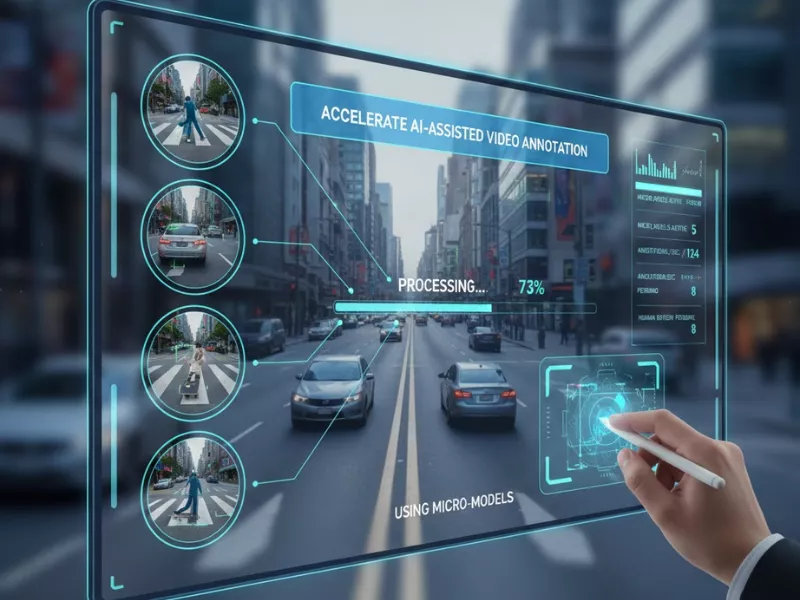
Micro-models employ small and specialized models in order to identify patterns to do extremely niche jobs. They are specifically designed by developers to serve as the most desired automated video annotation tools for a specific use scenario.
How it works: You train a light-weight micro model on a small subset of your specific data. After the algorithm masters your unique video footage, it efficiently manages the annotation tasks. It is a model-aided smart method of providing an unimaginably precise initial pass of labels. Lastly, human laborers just cross-check the labels so that the work can be completed in a short time.
Benefits:
- Optimizes speed and quality by specializing in one object type.
- Decreases the computational load compared to massive computer vision models.
- Specifically helps with how to automate video labeling for proprietary or rare datasets.
4. Auto Object Segmentation to Enhance Object Segments Quality

Auto Object Segmentation creates pixel-perfect masks rather than simple bounding boxes. This approach is one of the most effective AI video annotation methods in order to reach real-world accuracy.
Mechanism: To begin with, a user just needs to click an object to allow the Segment Anything Model (SAM) to identify the boundaries automatically. These exact segments are then duplicated immediately between the frames in the Automated Video Annotation system. Such detail delivers the best video annotation quality for sensitive tasks like medical imaging or robotics. By utilizing this tech, you ensure every project captures the pixel-level depth necessary for computer vision success.
Key Technical Advantages:
- Eliminates human error in tracing complex shapes.
- Vital for training computer vision systems to understand object boundaries.
- Replaces hours of tedious manual clicking with a single AI-assisted “snap-to-object” feature.
5. Keyframe Extraction & Pre-labeling for Rapid Workflow

The fifth technique involves intelligent keyframe extraction combined with pre-labeling. Its purpose is to ensure that you are not wasting resources on redundant or stagnant frames.
How it works: The right video annotation tool identifies sudden “change points” like scene cuts or fast movements. This professional software picks hundreds or thousands of important keyframes for your project. Once selected, the system uses pre-labels that are useful with the help of internal weights. These automatic features drastically optimize your annotation workflow. Only the few specific frames that baffle the AI model are then manipulated by human workers.
Benefits:
- Significantly decreases the volume of video information that humans have to go through.
- Accelerates the creation of structured training data.
- Facilitates the resolution of real-world problems through prioritizing human intelligence in the areas that it is most needed.
Example: In a 10-minute security video, the tool will not show the 5 minutes of stillness and will show the frames where there is movement only.
End Note
Deploying automated video annotation for machine learning now serves as a vital competitive necessity. Data is everything in the current tech landscape, so your project relies on superior results. You must save time while maintaining the strictest quality control to succeed. The benefits of automated video data annotation reach far beyond just increasing speed. By combining MOT, interpolation, and specialized micro-models, you build a robust AI development workflow. So, what are you waiting for? Turn your raw data into gold by utilizing the right video labeling automation with the help of experts today.
Frequently Asked Questions
How does automated video annotation work?
Intelligent AI programs recognize and monitor certain objects in all your video footage. Special software identifies objects in the starting keyframes and applies mathematical models to make predictions on motion. As a result, the system automatically generates labels of all intermediate frames at a very fast pace.
What industries use automated video annotation?
Is automated video annotation suitable for medical videos?
Yes, surgeons and radiologists rely on auto-segmentation for high-stakes diagnostic imaging. The technology is used to trace surgical tools and biological structures with amazing precision. The correct annotation of automated video data is the key component of the current AI training in healthcare.
Does automated video annotation really save money on data labeling projects?
The technology will help you to cut down on your spending by minimizing the high costs of human labor. You will be able to reduce your total budget by 50% -80%, and your video annotation will also be accelerated dramatically. Smart automation takes the economic pressure of having a huge and manual workforce to manage your training data.
Will automated video annotation still be accurate if my videos are very long or complex?
The use of custom micro-models means that there is also high accuracy even in very complex scenes. The bulk volume of the frames is processed by AI, and tricky details are checked by human-in-the-loop reviewers. This package will ensure 100 percent accuracy of your most challenging and lengthy projects.
Is automated video annotation safe for sensitive or confidential video data?
The best providers are the ones that adhere to the SOC2 compliance and GDPR security measures closely. Advanced systems with encrypted cloud systems ensure that your confidential data is in safe hands. Such security measures make sure that you never have unauthorized users access to your proprietary video file.
Should I build my own automated video annotation system or use a vendor?
The process of contracting an expert vendor is significantly quicker than developing an in-house solution. Your team must not waste months on software maintenance but employ professionals such as Annotationbox. This expert supplier provides automated pipelines of high quality and precision at present moment. By choosing a vendor, you can focus immediately on training your AI model instead of managing complex data infrastructure.

Want To See My Profile — Click Here Martha L. Ritter
- Synthetic Data in Computer Vision Annotation: Methods, Benefits & Applications - March 12, 2026
- 3D Object Detection: Why It’s Hard and What Matters in Production - February 17, 2026
- A Complete Vision Language Models Guide for ML Teams - February 9, 2026